AI Chat: Difference between revisions
No edit summary |
No edit summary |
||
| Line 36: | Line 36: | ||
I run it at 8-bit quantization across four GPUs. 8-bit quantization is quite close to lossless, i.e. practically identical to the original model. It's a dense model, so all 27b parameters are active for every token it generates. | I run it at 8-bit quantization across four GPUs. 8-bit quantization is quite close to lossless, i.e. practically identical to the original model. It's a dense model, so all 27b parameters are active for every token it generates. | ||
Also - for general conversation, you don't want the model to think for ages when all you've asked is "should I eat pasta" or something, for lack of a better example. | Also - for general conversation, you don't want the model to think for ages when all you've asked is "should I eat pasta" or something, for lack of a better example. | ||
Revision as of 21:15, 9 September 2026
What is this page?
This page goes into more detail about what each of the AI chat services on https://kek.ms/ are, and also technical details.
What is LibreChat?
This is my preferred frontend for interacting with LLMs. It's very well featured, doesn't slow down your PC with long chats, and is extensible. It's connected to my llama.cpp servers - which run the actual models. You can sign up with a fake email if you want.
How to select model in LibreChat
Use one of the chat templates, see this screenshot: https://kek.ms/static/screenshots/screenshot_20260908_235047.png
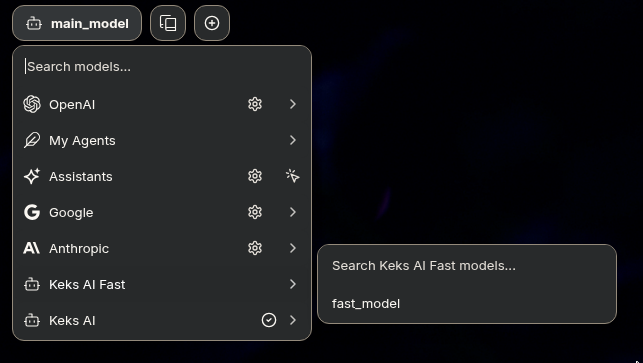
You want any of the ones labelled "Keks AI". It's at the top left of the main chat interface. The reason you want to use the templates is they have the settings already set up.
What is llama.cpp?
You don't really need to know this but it's here for clarity - this is what runs the actual models so that LibreChat can use them. It's the backend. It also does however serve its own little frontend. This is what the "no sign up required" links are.
Why use LibreChat instead of the "no sign up required" links on the same page?
The ones where you don't need to sign up do not store your chats on the server. This means chats etc are stored only in your browser. This is advantageous from a privacy perspective - but it means if you reset your browser, you lose your chats. LibreChat stores chats on the server, tied to your account. LibreChat also lags less with long contexts and is overall better to use. The no-sign-up-required links are just the default web interface which llama.cpp (the backend) provides. You can also input memories which persist per conversation and stuff like that.
However, if you do want to use the no-sign-up ones, you can actually export your chats from there and import them to other browsers if you want.
What if I want to use my own frontend?
You can use the models in any OpenAI compatible frontend. Just add "/v1/" to the end of the url, i.e. "https://llama.kek.ms/v1/" or "https://llama.kek.ms/v1/chat/completions" as the endpoint in your choice of application. Like OpenCode, or Codex, or whatever.
What model is running?
I run this...
https://huggingface.co/HauhauCS/Qwen3.8-27B-Uncensored-HauhauCS-Aggressive-MTP-GGUF
Qwen 3.8 27B is the best open dense model available at the moment, in my opinion.
I run it at 8-bit quantization across four GPUs. 8-bit quantization is quite close to lossless, i.e. practically identical to the original model. It's a dense model, so all 27b parameters are active for every token it generates.
Also - for general conversation, you don't want the model to think for ages when all you've asked is "should I eat pasta" or something, for lack of a better example.
I keep it online 24/7 and just use it as needed. I keep it at 262,144 maximum tokens context.
For reference, the book 'Moby-Dick' in its entirety, which you can find here, https://www.gutenberg.org/files/2701/2701-h/2701-h.htm, is about 260k tokens.
Limitations, and how to overcome them
The model knowledge cutoff date is late 2024. That means it has no new information beyond that date. I also don't currently serve any public tools you can link them into, but if you want - you can connect it to your own MCP servers to give it tools to use, some examples here.
I don't use any tools myself because I find it more efficient to just feed it the right information manually, but if you like tools, both the models do support tool calling.