AI Chat
What is this page?
This page goes into more detail about what each of the AI chat services on https://kek.ms/ are, and also technical details.
What is LibreChat?
This is my preferred frontend for interacting with LLMs. It's very well featured, doesn't slow down your PC with long chats, and is extensible. It's connected to my llama.cpp servers - which run the actual models. You can sign up with a fake email if you want.
How to select model in LibreChat
Use one of the chat templates, see this screenshot: https://kek.ms/static/screenshots/screenshot_20260908_235047.png
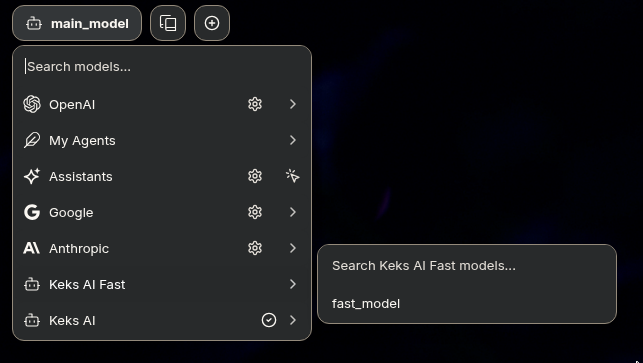
You want any of the ones labelled "Keks AI". It's at the top left of the main chat interface. The reason you want to use the templates is they have the settings already set up.
What is llama.cpp?
You don't really need to know this but it's here for clarity - this is what runs the actual models so that LibreChat can use them. It's the backend. It also does however serve its own little frontend. This is what the "no sign up required" links are.
Why use LibreChat instead of the "no sign up required" links on the same page?
The ones where you don't need to sign up do not store your chats on the server. This means chats etc are stored only in your browser. This is advantageous from a privacy perspective - but it means if you reset your browser, you lose your chats. LibreChat stores chats on the server, tied to your account. LibreChat also lags less with long contexts and is overall better to use. The no-sign-up-required links are just the default web interface which llama.cpp (the backend) provides. You can also input memories which persist per conversation and stuff like that.
However, if you do want to use the no-sign-up ones, you can actually export your chats from there and import them to other browsers if you want.
What if I want to use my own frontend to talk to the models?
You can use the models in any OpenAI compatible frontend. Just add "/v1/" to the end of the urls, i.e. "https://llama.kek.ms/v1/" or "https://llama.kek.ms/v1/chat/completions" as the endpoint in your choice of application. Like OpenCode, or Codex, or whatever.
What is the main model you run?
I run this...
https://huggingface.co/HauhauCS/Qwen3.8-27B-Uncensored-HauhauCS-Aggressive-MTP-GGUF
Qwen 3.8 27B is the best open dense model available at the moment, in my opinion.
I run it at 5-bit quantization on my two 9070 XTs. This is what I use 99% of the time. It's a dense model, so all 27b parameters are active for every token it generates.
I keep reasoning off (also known as thinking). Enabling reasoning does make the model get things right first-try more often, but it means you have to wait 10 years for it to think before it actually outputs something for you (which might still be wrong). I prefer to have a back and forth and just iterate as I go.
Also - for general conversation, you don't want the model to think for ages when all you've asked is "should I eat pasta" or something, for lack of a better example.
I keep it online 24/7 and just use it as needed. I keep it at about 100k maximum tokens context.
What is the secondary model you run?
I almost always have this model active, but I do disable it occasionally if I need to spare the VRAM to run ComfyUI generations.
This model is...
https://huggingface.co/HauhauCS/Qwen3.6-35B-A3B-Uncensored-HauhauCS-Aggressive/tree/main
I run it at 8-bit quantization. This means it's less compressed than the 27B - and it also takes more VRAM. I do this because it's a MoE model - which means only 3B parameters of the model are active per-token. The model selects which "expert" to use based on the context of the conversation, and each expert is kind of like a mini model which is specialised to that particular type of task. These are technical details so don't really matter. Ask if you're curious.
The bottom line is - this model is a bit lower quality than the 27B, but 5x faster. Thinking is also enabled, it's designed to blast through long-running tasks extremely quickly without much user input. This model is best for if you want to vibe code something without much input, or are bold enough to let it debug a software issue for you.
Which should I use?
Use the main model for general chat and back-and-forth, and more complex debugging... and use the secondary model if you want to give it a vague idea of what to do, and let it just generate huge amounts of content very quickly.
The fast model also has 2.5x as much context available, so conversations can be 262k tokens long, instead of 100k which is what the 27b is limited to.
Limitations, and how to overcome them
The model knowledge cutoff date is late 2024. That means it has no new information beyond that date. I also don't currently serve any public tools you can link them into, but if you want - you can connect it to your own MCP servers to give it tools to use, some examples here.
I don't use any tools myself because I find it more efficient to just feed it the right information manually, but if you like tools, both the models do support tool calling.